Every message
becomes a customer.
Watx pulls WhatsApp, Instagram, web chat and form enquiries into one inbox, lets AI agents answer them in seconds, and pushes the real buyers straight into your sales pipeline.
15-day free trial · No card required · Cancel anytime
Your customers already replied to WhatsApp today.
Median read rate on WhatsApp broadcast campaigns
Source: SendPulse benchmark, 355 business accounts, Nov 2025–Apr 2026
Daily chat threads with businesses across WhatsApp, Messenger and Instagram
Source: Meta, June 2026
Industry figures about WhatsApp as a channel — not claims about Watx. Each is shown with its source.
One phone. Five people. No idea what was promised.
The shared handset nobody owns
One phone gets passed around the sales floor. Nobody knows who replied, what was promised, or where the conversation stands.
Broadcasts that get numbers banned
Blasting messages through grey tools is a fast way to lose your number. There is no safe way to reach everyone at once.
Leads that nobody follows up
Enquiries arrive from ads and forms at all hours. By the time someone gets to them, the buyer has already messaged a competitor.
The same twenty questions, all day
Price, stock, hours, location — asked and answered a hundred times a week. Your team is a search engine with a keyboard.
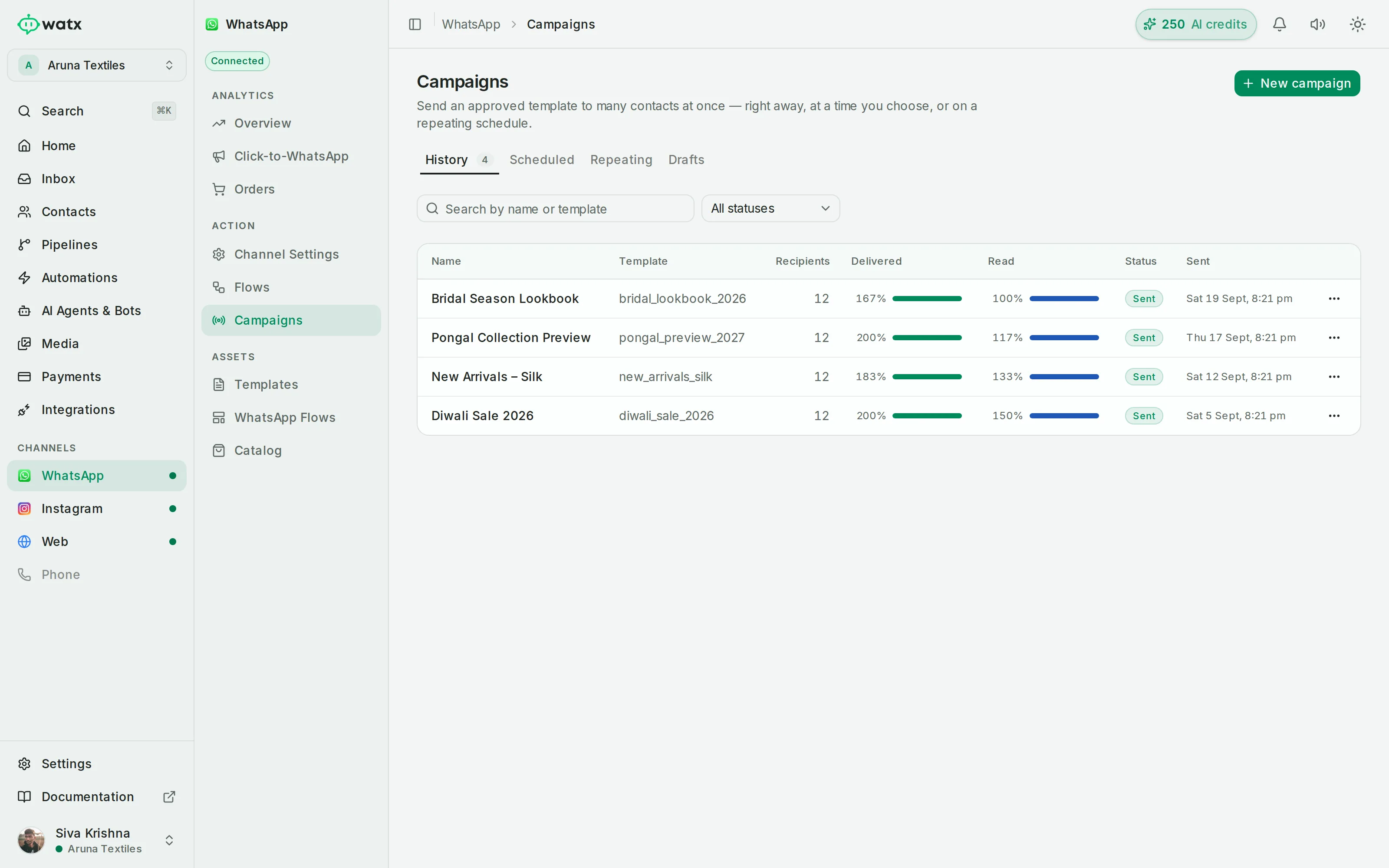
Reach everyone who opted in — without risking the number.
Send approved WhatsApp templates to a segment, tag or uploaded list. Personalise per recipient, schedule it, and let Watx meter delivery so your number stays healthy.
- Approved templates with per-recipient variables
- Segments: static lists or dynamic saved filters
- Scheduling and suppression lists
- Delivery, read and failure counts per recipient
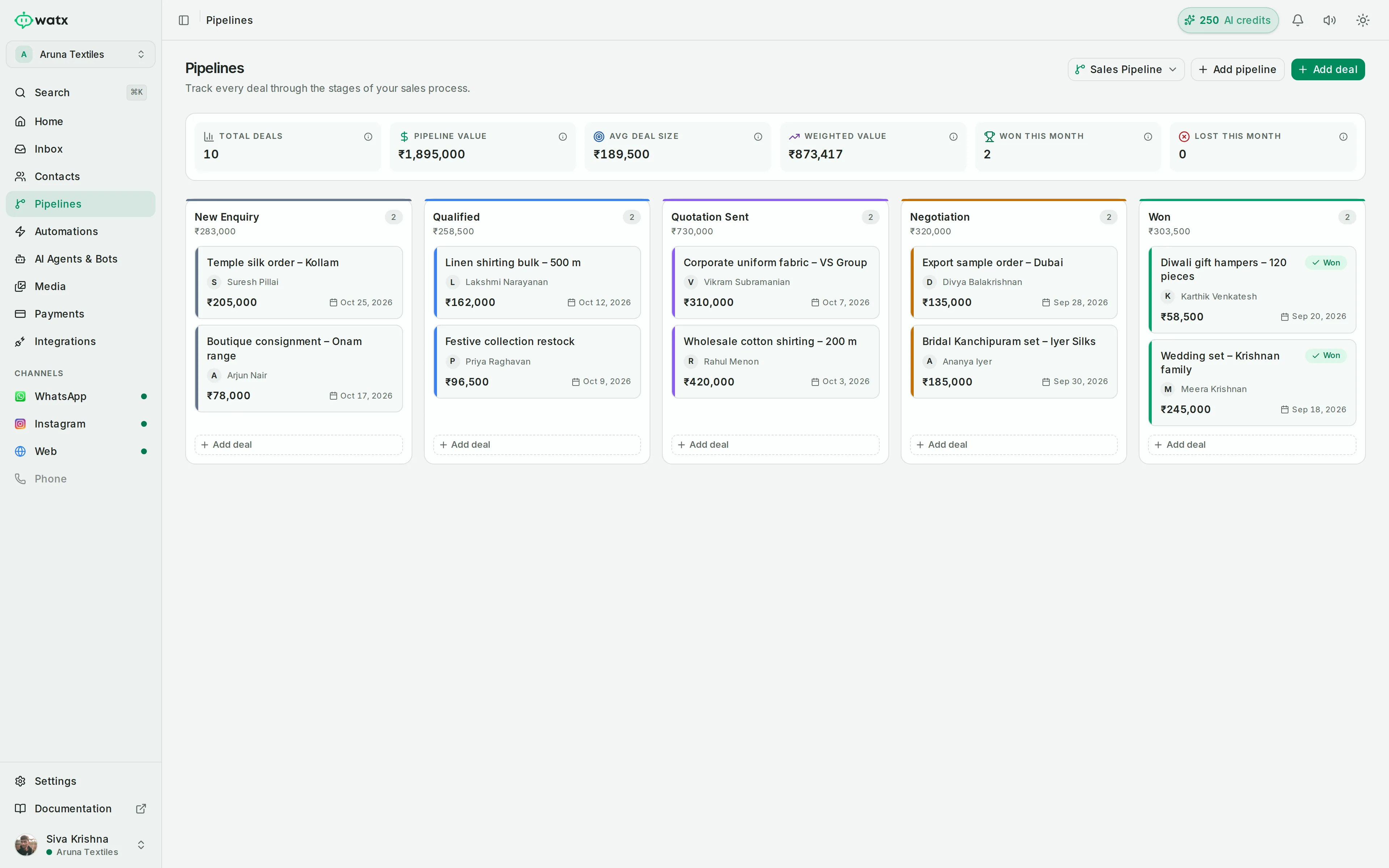
Catch every lead and move it down a pipeline.
Enquiries from WhatsApp, Instagram and web chat land in one shared inbox. Attach deals to conversations and track each one through your own kanban stages.
- Shared inbox with assignment and status
- Deals linked to contacts and conversations
- Custom pipeline stages with value tracking
- Click-to-WhatsApp attribution on the conversation
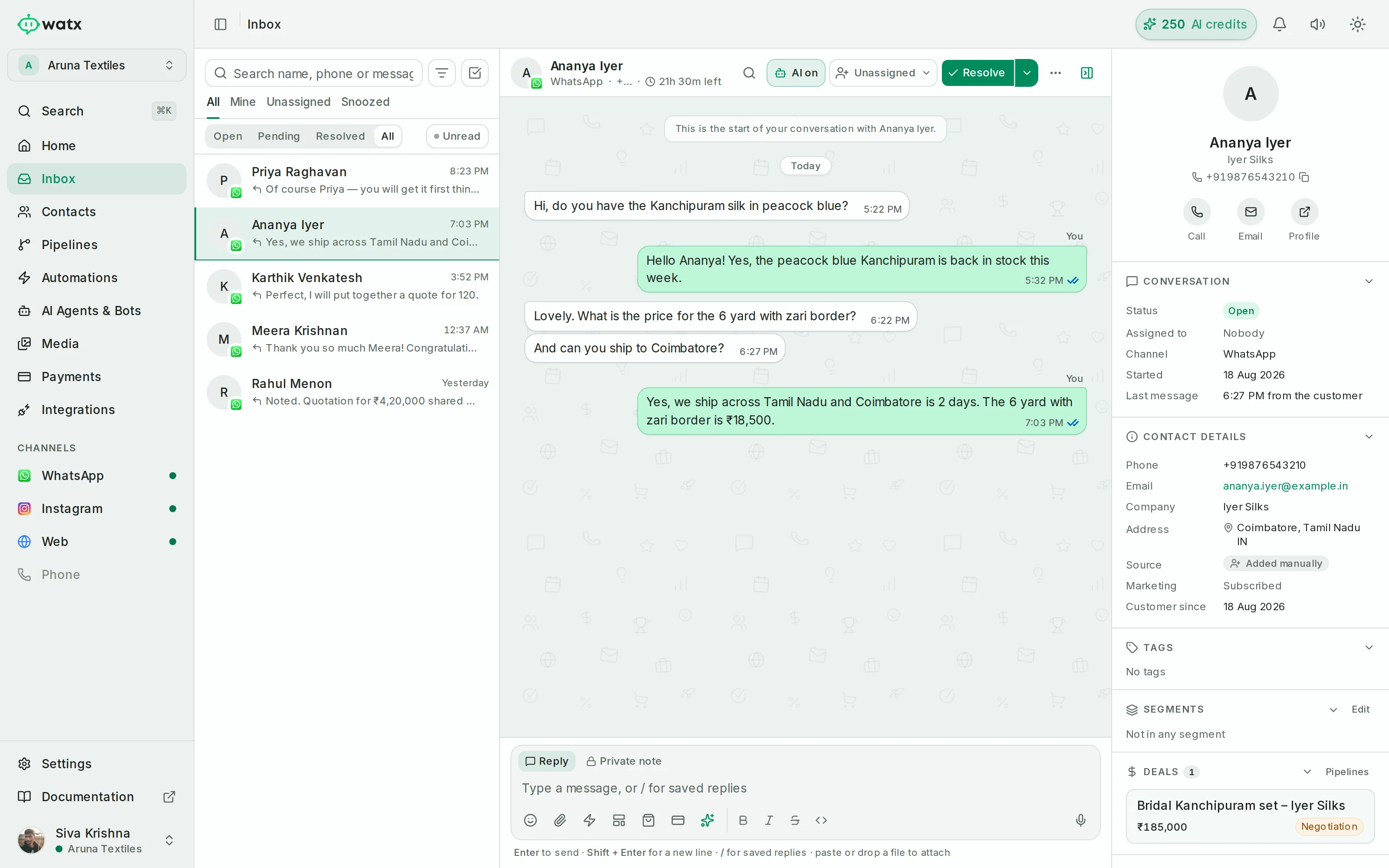
Answer the repetitive questions in seconds.
Point an AI agent at your own knowledge base. It answers from your documents, uses skills like order lookup, and hands off to a human when it should — every reply attributed.
- Knowledge base from PDFs, DOCX or a crawl
- Skills and custom API actions
- Draft, test and playground modes
- Recorded hand-off to a human
Everything the conversation needs, in one place.
Broadcasts & templates
- Submit and track template approval
- Send to a segment, tag or list
- Rate-managed delivery with status
Forms & bookings
- Drag-and-drop builder with live preview
- Conditional fields and multi-step pages
- Booking slots with capacity and buffers
Product catalogue & orders
- Sync your WhatsApp catalogue
- Send single products or lists in chat
- Orders tied to the conversation
Click-to-WhatsApp attribution
- Track the click that started the chat
- Attribute it through to the deal
- See which ad actually converted
One login. Every client.
Hold memberships in any number of workspaces, with a different role in each. Switch between clients without signing out — and no data ever crosses between them. Each workspace is isolated at the database level.
- A different role per workspace (owner / admin / member)
- Switch clients without signing out
- Strict per-workspace isolation — nothing leaks across accounts
- Reuse automations, templates and media where you choose
Connect it to what you already use.
Built into Watx — plus a website chat widget and a public REST API for everything else.
See all integrations WhatsApp
  Instagram
  Meta ads
  Shopify
  WooCommerce
  Razorpay
  Gmail
Gmail  Google Calendar
  Google Sheets
  Google Meet
  Cal.com
  Zapier
  n8n
n8n  OpenAI
 Official API, unofficial tool, or build it yourself?
An honest look. The other two options are genuinely better at some things — here's the whole picture.
- Ban riskLow — official API, compliant by design
- Keeping the WhatsApp Business appYour choice — coexistence keeps the app on your number
- Message templatesCreate, submit and track approval in-app
- Shared team inboxBuilt in
- AI agentsBuilt in — or bring your own key
- Broadcast delivery reportingPer-recipient status, read & retries
- Engineering time to launchMinutes
- Ongoing maintenanceWe handle it
- SupportProduct support, SLA on Enterprise
- Cost shapePredictable subscription + Meta fees
- Ban riskHigh — the number can be blocked anytime
- Keeping the WhatsApp Business appYes, by hooking the app — which is what puts the number at risk
- Message templatesOften unsupported or risky
- Shared team inboxSometimes, varies by tool
- AI agentsRarely
- Broadcast delivery reportingLimited or unreliable
- Engineering time to launchMinutes
- Ongoing maintenanceTool + workaround upkeep
- SupportCommunity or limited
- Cost shapeCheap upfront, risk of losing the number
- Ban riskLow — official API
- Keeping the WhatsApp Business appPossible, but you build the onboarding and message sync
- Message templatesYou build the approval flow
- Shared team inboxYou build it
- AI agentsYou build it
- Broadcast delivery reportingYou build reporting
- Engineering time to launchWeeks to months
- Ongoing maintenanceYour team, forever
- SupportYou are the support
- Cost shapeHigh build + infra + salaries
Start with a free trial. Pay when it's working.
Starter
One team getting off a shared phone.
- 1 AI agent
- Shared inbox + broadcasts
- Automations & forms
Growth
Growing sales + support teams.
- 5 AI agents
- Chatbot flows + catalogue
- Multiple workspaces
Enterprise
Multi-brand / high volume.
- Unlimited AI agents
- SSO, SLA & priority support
- Custom volume
15-day free trial. No card required. One trial per workspace. · Compare all plans →
Keep the app on your phone. Or don’t.
Going official has always meant giving up the WhatsApp Business app on your number. Not any more — Watx asks which you want on the first screen, and both routes run on the official Meta Cloud API, on your own WhatsApp Business Account.
Stay on the WhatsApp Business app
Your number stays where it is. You carry on replying from the app on your phone, and every one of those replies also lands in the shared inbox — alongside what your team sends from Watx.
- The WhatsApp Business app keeps working on the number
- Replies from your phone appear in the Watx inbox
- Meta fixes the send rate at 20 messages per second
- Catalogue and orders are not available on this route
Move the number to the Cloud API
The number moves onto the official WhatsApp Business Cloud API and your team works entirely out of Watx. Nothing is capped and nothing is switched off.
- The WhatsApp Business app stops working on that number
- Your full Meta send rate on broadcasts
- Catalogue, orders and every feature in Watx
- The right choice for a team answering at volume
Either way the chats already sitting on your phone are not copied across — the inbox fills from the next message onwards. You can change route later without losing anything in Watx. Read how coexistence works →
Live in a day, not a quarter.
Connect your WhatsApp Business number
Link your WhatsApp Business Account through the official Meta Cloud API. Move the number across, or keep it on the WhatsApp Business app — you pick on the first screen.
Import contacts and invite the team
Upload a CSV, then invite teammates by email with owner, admin or member roles.
Switch on an AI agent
Point an agent at your knowledge base, test it in the playground, and set it live in draft or test mode first.
Built on the official API, and built to keep your data separate.
Official Meta Cloud API
Everything runs on the official WhatsApp Business Cloud API — no grey automation.
Per-workspace data isolation
Isolation is enforced at the database level. Workspaces cannot see each other.
Encrypted credentials at rest
API keys and third-party tokens are encrypted and never shown in the UI or logs.
Template approval & opt-outs
Template submission, approval status and opt-out handling are built into the product.
The 24-hour window, enforced
WhatsApp's customer-service window is surfaced and enforced, prompting for a template when required.
Scoped API keys you can revoke
Create keys scoped to what they need, and revoke them at any time.
Questions, answered.
Is this the official WhatsApp API?
Yes. Watx runs entirely on the official Meta WhatsApp Business Cloud API. There is no unofficial bridge and no grey automation, so your number stays compliant.
Will my number get banned?
Using the official Cloud API is the compliant path and removes the ban risk that comes from grey tooling. Bans generally follow policy breaches — sending without opt-in, prohibited content, or poor quality. Watx enforces template approval, opt-outs and the 24-hour window to help you stay within the rules.
What does Meta charge on top of my Watx plan?
Meta bills you directly for the template messages you send, separate from your Watx subscription. Since July 2025 that is per delivered message, priced by category — marketing, utility or authentication — and by the recipient’s country. Replies inside the 24-hour service window are free, and your Watx plan adds no per-message markup on top. Our free pricing calculator estimates a month.
How long does approval take?
Connecting your number and getting message templates approved is usually quick — often within a day. Times are set by Meta and can vary with the template content and your account standing. You can track approval status inside Watx.
Can I use my existing WhatsApp Business number?
Yes, and you choose how. Either move the number onto the official WhatsApp Business Cloud API — after which the WhatsApp Business app stops working on it — or connect it in coexistence mode, where the number stays on the app, you keep replying from your phone, and those replies appear in the Watx inbox too. Both run on the official Meta Cloud API and both are set up in the guided connect flow.
Will I lose the WhatsApp Business app on my phone?
Only if you choose to. Coexistence keeps your number on the WhatsApp Business app and adds Watx alongside it, so the phone carries on working exactly as it does today. The trade-offs are set by Meta, not us: sending is fixed at 20 messages per second, the WhatsApp catalogue and orders are not available, and a few app features — broadcast lists, disappearing messages, view-once and live location — are switched off. Moving the number fully onto the Cloud API removes all of those limits but ends the app on that number.
Do my old chats come across when I connect?
No. Neither route copies the conversations already on your phone into Watx — the inbox fills from the next message onwards, and contacts are created as people write in. You can import your contact list separately from a CSV at any time.
What are broadcast and messaging limits?
Meta assigns your number a messaging-limit tier that increases as you send quality traffic over time. Watx shows your current tier and quality rating, and meters broadcast delivery to protect your number. Your Watx plan also sets contact and broadcast allowances.
Do I need a developer?
No. The inbox, broadcasts, automations, chatbots and AI agents are all no-code. If you do have a developer, there is a public REST API, webhooks and HTTP steps to build on — but you do not need one to get started.
What happens to my data if I leave?
Your data is yours. You can export contacts and conversations at any time, and cancel whenever you like. On termination we delete or return your data as described in our Data Processing terms.
Start with your own number, today.
Give your team one inbox, put AI on the repetitive questions, and watch the real buyers land in your pipeline.
15-day free trial · No card required · Cancel anytime