One shared inbox your whole team can work from.
The free WhatsApp Business app is tied to a handset, so two people cannot work one number properly — no assignment, no status, no way to know whether Tuesday's message was ever answered. This is the fix: WhatsApp, Instagram and your website chat in one real-time queue, with the full history on every contact.
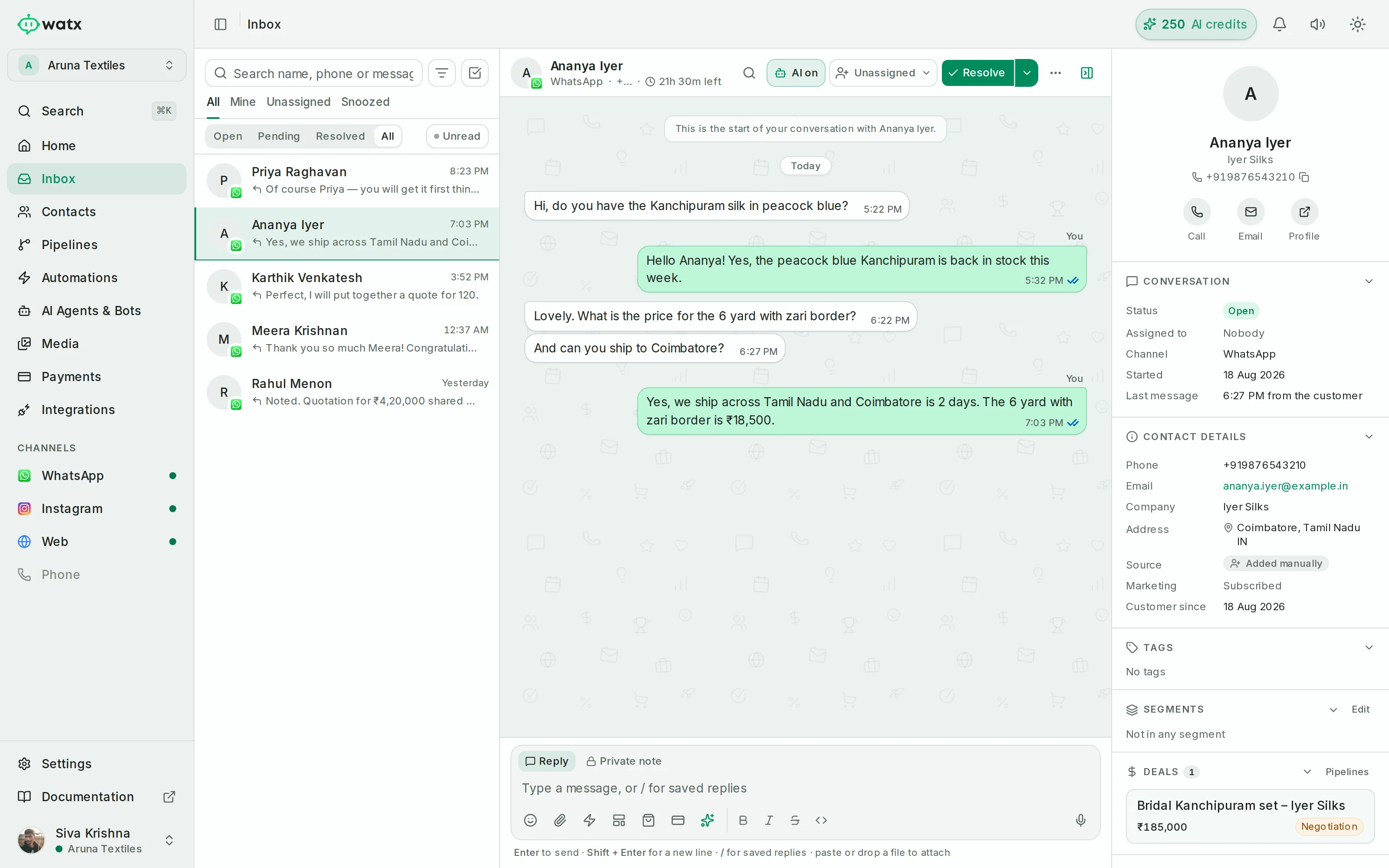
One inbox your whole team can see.
WhatsApp, Instagram DMs and your website chat widget land in a single shared, real-time inbox. Assign conversations, track status, and keep the full history on every contact — no more passing a phone around.
- Assignment, status and full history per contact
- Reply with media, interactive buttons, list menus, catalogue products and voice notes
- Contact profile, tags, custom fields and deals in the sidebar
- The 24-hour customer-service window is surfaced right in the UI
Team inbox, answered.
How many people can work one number?
As many as your plan allows — three on Starter, fifteen on Growth, unlimited on Enterprise. They all see the same queue, and assignment decides who owns which conversation.
Does Instagram come into the same inbox?
Yes. WhatsApp, Instagram DMs and the website chat widget land in the same queue with the same assignment, status and contact history, so someone who asks on Instagram and follows up on WhatsApp is one person with one thread.
What is the 24-hour window shown in the inbox?
Free-form replies are only possible within 24 hours of the customer's last message. Watx counts that window down on each conversation so nobody writes a careful reply that cannot be sent.
The rest of the platform
- Official Cloud API Run on the official Meta Cloud API — and stay compliant.
- Contacts & segments Every contact, filed the way your team actually works.
- Broadcasts Send at scale without risking your number.
- Automations No-code automations on a visual canvas.
- Chatbot flows Conversational flows you can test before you ship.
- AI agents AI agents that answer the boring 70% — and hand you the rest.
- Deal pipelines See which conversations turned into revenue.
- Forms & bookings Forms and booking pages that feed straight into Watx.
- Catalogue & orders Sell your catalogue right inside the chat.
- Google Workspace Run Gmail, Calendar and Sheets under your own Google authority.
- Ad attribution Know which ad started the conversation that closed.
- API & webhooks A real API, webhooks, and Zapier for the long tail.
- Workspaces & team Built for one team — or an agency running fifty.
- Trust & compliance We treat your number like it pays the bills.
All of it, on one number.
Watx is one platform, not fifteen add-ons. 15-day free trial, no card, and you can keep the WhatsApp Business app on your number while you try it.